For Synology DSM 7

Your NAS, wherever you are.

Syno Manager is a native Synology app for Android, iOS, macOS and Windows. Live system, storage and network readings, Docker, cameras, photos, backups and files - the parts of DSM you actually check, in one fast app that adapts to exactly what your NAS runs.


DSM 7.0+Android 7+iOS 16+macOS 11+Windows
Get it on Google PlayDownload on the App StoreDownload on the Mac App StoreGet it on the Microsoft Store
$6.99 once* No ads No subscriptions No cloud of ours Multi-NAS Works away from home
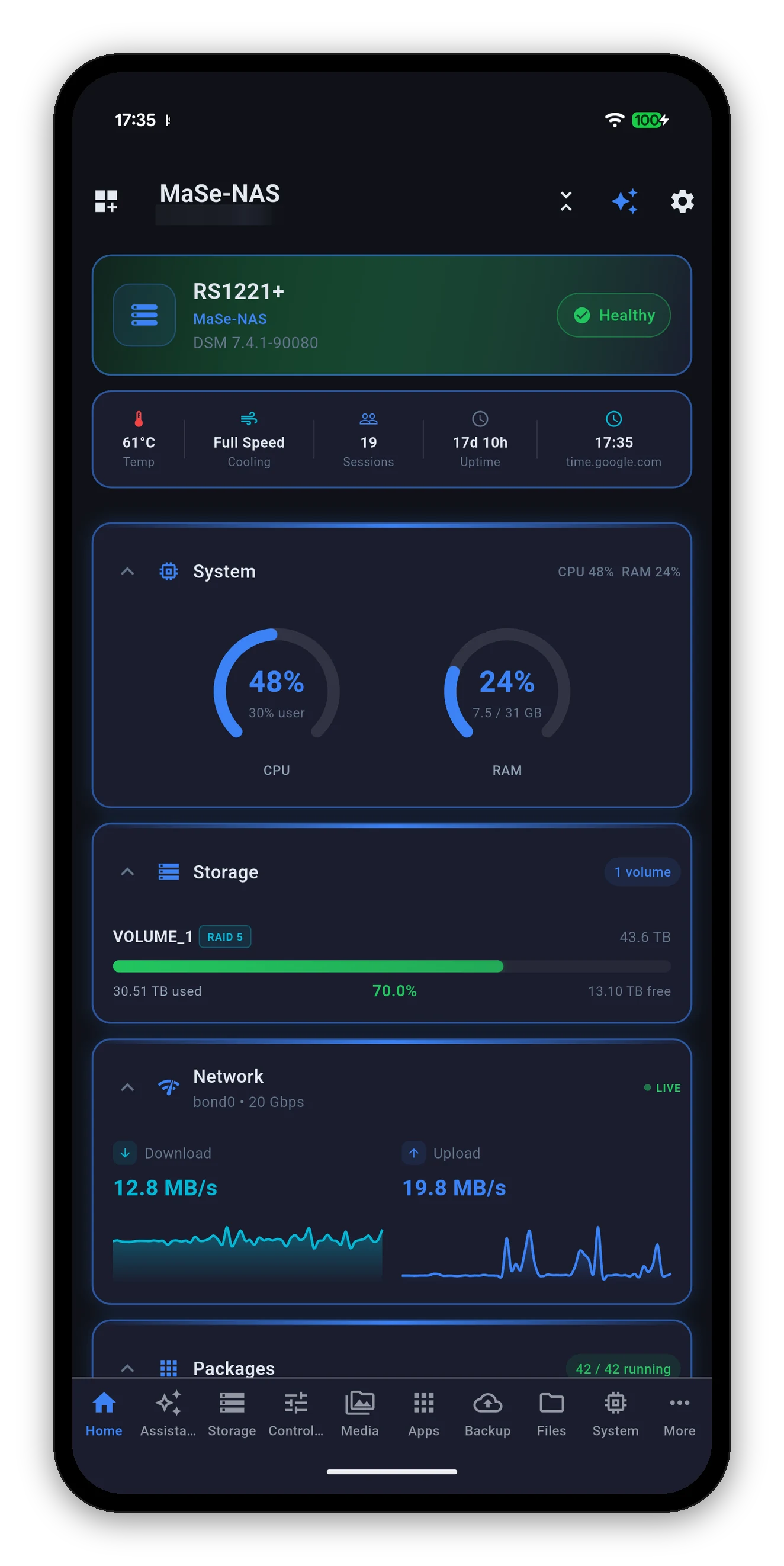
Syno Manager home screen showing a Synology RackStation at a glance
Why Syno Manager

A native app, not a web console

Checking whether a backup ran should not mean signing in to DSM and driving a browser UI built for a mouse. Syno Manager reads the same APIs DSM's own web interface uses and lays the answers out natively - on a phone, a tablet, a Mac or a PC, each one adapting to the screen it is on.

Live, not cached

CPU, memory, temperature, disk I/O and per-interface throughput update while you watch, at an interval you choose.

🧩

Shaped by your NAS

The app asks your NAS what it can do and hides everything it cannot. No dead buttons for packages you do not run.

🔒

Direct connection

Your device talks to your NAS. Nothing passes through a MiyaraHub server, because there isn't one.

What's inside

Deep where it counts

Tap any area for the full guide - what every screen shows, what every control does, and what it will not do.

🏠

The home screen ›

A health header, a quick-stats row and a grid of cards you can reorder, collapse or switch off. It remembers how you left it.

🧠

System & resources ›

CPU and RAM gauges, load average, disk I/O, temperature history, fan speed mode, the DSM update check and power controls.

💾

Storage & drives ›

Volumes and pools with RAID type and free space, per-drive SMART status and temperature, a Quick SMART Test, and safe eject for external drives.

🌐

Network ›

Live throughput per interface, active connections, DSM services, VPN profiles, and DDNS with your public address.

📦

Packages, Docker & VMs ›

Browse the catalogue and install, update or uninstall. Start, stop and restart containers, read their logs, run whole Compose stacks.

📷

Photos, Drive & cameras ›

Your whole photo library with real previews, Drive and team folders, and Surveillance Station live view - all of it over QuickConnect too.

🔄

Backups ›

Hyper Backup tasks with the space they actually take on the destination, and Active Backup devices with a deduplicated total per workload.

The assistant ›

Ask about your NAS in plain words. The model runs on your phone, works with the network off, and only ever reads.

⬇️

Download Station ›

Add a link, a magnet or a .torrent from your phone, watch progress, and change the settings the NAS actually reported.

📁

Files & shares ›

Browse File Station, manage shared folders, and read Note Station, Office and Contacts.

🔌

Wake-on-LAN ›

Wake the NAS, or any other machine on your network through the NAS - which works from anywhere, the way DS Router does it.

🎨

Make it yours ›

Six accent colours or any one you pick, AMOLED true black, text size, which cards appear and which tabs are in the bottom bar. See all six accents.

Screenshots

A look inside

Every shot on this site is the current app running against a real Synology, not a mock-up. Tap any of them to see it full size.

Syno Manager screenshot
Privacy

There is no server in the middle

Syno Manager is a client for your NAS, not a service. Your phone opens a connection to your DiskStation and that is the whole architecture.

  • No MiyaraHub server. Nothing about your NAS reaches us, because there is nowhere in the path for it to go.
  • Credentials in the keychain. Held in the platform's secure storage, never in plain text, and excluded from device backups.
  • 2FA and device trust. One-time codes are supported, and a trusted device is remembered so you are not asked every launch.
  • The assistant is on-device. Your question, your NAS data and the answer never leave the phone.
  • One thing does leave: crash reports, so a crash can be fixed. They carry a stack trace, not your NAS. The whole picture.
Your NAS

DSM 7.0 and later

Every Synology running DSM 7 is supported, from a two-bay DiskStation to a rackmount with an expansion unit. The app discovers what your NAS offers rather than assuming a model.

Check your model   Getting started

Not sure it can reach your NAS? If DSM's own web interface and Synology's apps can reach it on the same network, so can Syno Manager - it speaks the same API on the same port.
Common questions

Synology on a phone, answered

What does Syno Manager do?
It puts the parts of DSM you actually check on a phone into one app: live CPU, RAM, temperature and network readings, storage volumes and per-drive SMART health, Docker containers, Package Center, Surveillance Station live view, Synology Photos and Drive, Hyper Backup and Active Backup, Download Station, File Station, users, scheduled tasks, UPS, DDNS and Wake-on-LAN. It talks to your NAS directly using DSM's own documented APIs. The User Guide covers every screen.
Which Synology models does it work with?
Any Synology NAS running DSM 7.0 or later. The app reads what your particular NAS reports on connect and only shows the screens it actually supports, so a two-bay DS223j and a rackmount RS1221+ each get a dashboard that matches what they can do. See compatibility.
Does it work when I am away from home?
Yes. Add your NAS once and the app uses whatever route is reachable - your local IP at home, or QuickConnect, a custom domain or a VPN when you are out. Photos, camera live view, and File Station and Drive downloads all work over the QuickConnect relay, so no port forwarding is required. See remote access.
Does my data go through your servers?
Your NAS data does not. Syno Manager connects to your NAS directly and there is no MiyaraHub server in that path, so your files, readings and configuration never reach us. Credentials are held in the device keychain or keystore and are excluded from device backups, and the assistant runs its model on your phone. The one thing that does leave the device is a crash report, through Firebase Crashlytics - a stack trace, the device model and the app version, and none of your NAS data. The full detail is here.
How much does Syno Manager cost?
A one-time purchase of $6.99. No ads, no subscriptions and no in-app purchases - every feature is included, updates included.

It is priced per platform, so Google Play and the Microsoft Store are separate purchases. Apple is a single universal purchase covering iPhone, iPad and Mac - buy it once and it is on all three.

Does it support two-factor authentication?
Yes. If your DSM account uses 2FA the app prompts for your one-time code and can remember the device so you are not asked again on that phone. It also captures and sends DSM's SynoToken on every control action, which is what DSM requires of any client that changes something.
Can it manage more than one NAS?
Yes. Add as many as you like and switch between them from the device list. Each one keeps its own credentials, its own dashboard layout and its own settings. See multiple NAS devices.

Get it on your phone

A one-time $6.99 purchase.* No ads, no subscriptions, no in-app purchases. Add your NAS and you are looking at it in under a minute.

Get it on Google PlayDownload on the App StoreDownload on the Mac App StoreGet it on the Microsoft Store

* One-time purchase per platform. Apple is a single universal purchase covering iPhone, iPad and Mac.

Report a bug or request a feature